


bimmer-tool Lite
4.325.00 Reviews
App Specs
- Version
- 3.8.26-L
- Updated On
- License
- Free
- Downloads
- 100,000+
- Developer
- bimmer-tool
- Categories
- Auto & Vehicles
- Platform
- Android
Screenshots
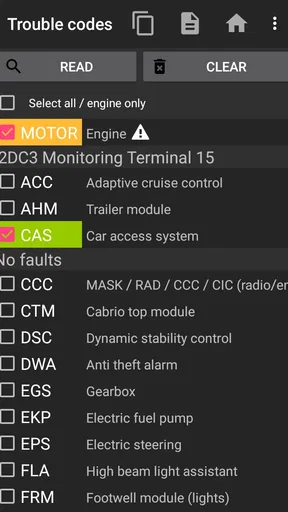
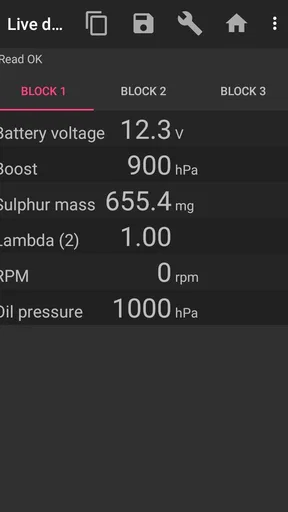
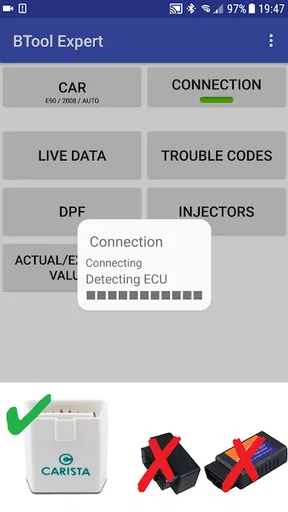
 Analysis by AppCompare
So, I recently got my hands on bimmer-tool Lite, and let me tell you, if you're a BMW enthusiast, this app might just become your new best friend. It’s like having a mini diagnostic tool right in your pocket. But let's dive in and see what makes this app tick.
First Impressions
When I first downloaded bimmer-tool Lite, I was curious about how well it would perform compared to some of the more expensive tools out there. The app’s interface has a sleek look, which makes it easy for anyone to navigate, even if you're not a tech whiz. The colors are easy on the eyes, and everything is pretty self-explanatory.
Features You’ll Love
What really caught my attention was the range of features packed into this little app. You can do everything from reading fault codes to viewing sensor data in real time. Imagine being able to diagnose your BMW’s issues without having to make an extra trip to the mechanic. That’s a game-changer!
Real-time data is one of the coolest features for me. It's like having a health monitor for your car, displaying everything from engine temperature to fuel consumption as you drive. It feels like something out of a spy movie.
Setting It Up
Setting up the app is a breeze. You just need an OBD-II adapter, which you can easily find online or at your local auto store. Once you’ve got that hooked up, the app walks you through the connection process, and you’re good to go. It’s as simple as plugging it in, connecting via Bluetooth, and launching the app.
Performance on the Road
On the road, bimmer-tool Lite performs like a champ. I took my car out for a spin and was amazed at how quickly the app could pull up fault codes. It's almost instant! Plus, being able to clear those codes on the fly is incredibly satisfying. It feels like you have a direct line to your car’s brain.
One thing to note, though, is that while the app provides a wealth of information, it’s always good to have a basic understanding of what those codes mean. Otherwise, it might feel a bit overwhelming at first.
Worth Reading Before You Choose

EA SPORTS FC Mobile 26 Is a Bigger Football Game, but It Takes Time

Flipboard Shows What News Apps Must Do Beyond the Feed

Switching to Android Auto Means Rethinking Your Driving Routine

Google Calendar Makes a Crowded Week Easier to Manage

Ludo King Makes the Most of the Minutes Between Plans

Baby Panda World Brings Quick Play to Modern Phones, but Its Game Library Feels Busy
Room for Improvement
Now, no app is perfect, and bimmer-tool Lite is no exception. While it offers a lot, it doesn’t cover everything that the full version does. So, if you’re looking for more advanced diagnostics or coding options, you might need to upgrade. Also, while the app is generally stable, I did experience a couple of hiccups with Bluetooth connectivity, but nothing a quick restart couldn't fix.
Final Thoughts
Overall, bimmer-tool Lite is a fantastic tool for any BMW owner looking to gain more insight into their vehicle’s performance. It's user-friendly, packed with features, and can potentially save you a ton of money on diagnostics. It’s like having a trusty sidekick that keeps your car running smoothly.
Whether you're a seasoned gearhead or just someone who likes to keep tabs on their car’s health, this app is definitely worth checking out. Just remember, while it provides valuable insights, it’s always good to consult with a professional mechanic for any serious issues. Happy driving!
Pros
- User-friendly interface with intuitive navigation.
- Real-time diagnostics for accurate assessments.
- Supports a wide range of BMW models.
- Offers free basic features for casual users.
- Quick and easy Bluetooth connectivity.
Cons
- Limited features in the free version.
- Advanced diagnostics require in-app purchases.
- Not compatible with all BMW models.
- Some users report occasional connectivity issues.
- Interface lacks customization options.
FAQs for bimmer-tool Lite
What is bimmer-tool Lite and what can I do with it?
Bimmer-tool Lite is a diagnostic app designed for BMW vehicles, allowing users to access various diagnostic functions. With it, you can read and clear fault codes, monitor real-time data, and perform basic coding. It's a great tool for BMW enthusiasts and owners who want to maintain their vehicles efficiently.
Is bimmer-tool Lite compatible with all BMW models?
Bimmer-tool Lite is compatible with a wide range of BMW models, but it's important to check the app's compatibility list before downloading. Some features may only be available for specific models or years, so verifying compatibility with your vehicle is crucial for optimal use.
Do I need any additional hardware to use bimmer-tool Lite?
Yes, to use bimmer-tool Lite, you'll need an OBD-II adapter that connects to your vehicle. The app typically supports Bluetooth or Wi-Fi adapters, so ensure you have a compatible one. The app's website or support section should offer a list of recommended adapters for ease of use.
Are there any costs associated with using bimmer-tool Lite?
While bimmer-tool Lite itself is free to download, certain advanced features may require in-app purchases or a subscription. This allows users to unlock additional diagnostic capabilities. Be sure to review any potential costs within the app to avoid unexpected charges.
How user-friendly is bimmer-tool Lite for beginners?
Bimmer-tool Lite is designed with an intuitive interface that caters to both beginners and experienced users. The app provides clear instructions and a user-friendly layout, making it accessible for those new to vehicle diagnostics. However, familiarity with basic car maintenance can enhance your experience.


